Where to Start with AI Transformation for Digital Products


- What is AI transformation for digital products?
- 1. Define the job the user needs to complete
- 2. Map AI opportunities across the user journey
- 3. Choose the first use case by impact, feasibility and the cost of errors
- 4. Define the data and the product’s boundaries together
- 5. Design the right interaction for the task
- 6. Design for errors, uncertainty and user control from the start
- 7. Validate the experience and the technical performance separately
- 8. Measure success through completed work
- An example plan for a first pilot
- How VOYA approaches AI product transformation
- Frequently asked questions
- Where should AI transformation start in an existing digital product?
- Does AI transformation require a complete product redesign?
- What role does UX design play in AI features?
- How do you know whether the first pilot has succeeded?
- Sources and further reading
In a SaaS platform, a user gathers data from several screens to put together a report. In a financial app, they can see their transactions but still have to work out what has changed. In a procurement system, supplier quotes sit side by side, yet identifying the differences that matter remains the user’s job.
These products work. People can complete their tasks. But reaching an outcome still takes considerable attention, interpretation and follow-through.
This is where AI transformation for digital products begins: Which parts of the work users currently do themselves could the product take on?
The answer might be a better search experience, a comparison summary or a prepared action the user can review. What matters is whether AI makes the work easier in practice.
This guide provides a practical framework for finding AI opportunities in an existing digital product, choosing a starting point and turning an idea into a measurable product experience.
What is AI transformation for digital products?
AI transformation for digital products means redesigning how people find information, interpret data, make decisions and complete tasks using the capabilities of artificial intelligence.
It can happen at several levels of the product:
| Area of transformation | Example experience | Potential user value |
|---|---|---|
| Information access | Preparing an answer from multiple documents with source references | Reduces searching and reading |
| Interpretation | Explaining changes in a report | Makes data easier to understand |
| Decision preparation | Comparing options against defined criteria | Reduces the effort of evaluating alternatives |
| Action preparation | Creating an editable draft based on the user’s goal | Reduces repetitive data entry |
| Workflow support | Identifying missing information and preparing the next step | Helps users complete the task |
These are possible use cases, not promises of equal value across every product. Their suitability depends on user needs, data quality, the consequences of errors and technical constraints.
McKinsey’s research on AI transformation also emphasizes that greater tool adoption alone does not create lasting business value. How work gets done needs to change. For digital products, the implication is to examine the user’s end-to-end experience.
1. Define the job the user needs to complete
The first output of an AI product strategy should be a clear understanding of the outcome the user wants to achieve.
“They use the reports screen” describes a behavior.
“They need to understand why sales have fallen and decide which region needs attention” describes the job.
The second definition makes potential AI opportunities much easier to identify. Accessing a report may only be one part of the problem. The user might also need to compare periods, find exceptions and turn the findings into an action.
Start with these questions:
- What job brings the user to the product?
- Where do they pause, go back or ask for help?
- What information do they take outside the product to work with?
- Where do they enter the same data again?
- When do they need someone else to interpret the information?
Product analytics shows where behaviors occur. User interviews and usability testing help explain why they occur.
Google’s People + AI Guidebook similarly starts with identifying a user need and evaluating whether AI can make a distinctive contribution to addressing it.
Output: A clear problem statement describing a specific user group, the job they need to complete and the obstacle they face today.
2. Map AI opportunities across the user journey
Once the problem is clear, examine the current workflow step by step.
For example, a user in a B2B procurement platform might:
- Open quotes received from suppliers.
- Extract pricing, delivery terms and payment conditions from different documents.
- Transfer the information into a shared table.
- Identify missing fields or terms that cannot be compared directly.
- Prepare an assessment and submit it for a manager’s approval.
There may be several AI opportunities in this workflow. Each requires its own product decision.
Extracting information, comparing quotes and executing a purchasing decision have different requirements for accuracy, permissions and control.
For each step, answer three questions:
What can the product prepare? What should the user evaluate? Who should make the final decision?
This makes AI’s role concrete. The team gains specific opportunities to reduce user effort, giving a broad idea such as “add an AI assistant” a useful scope.
Output: An AI opportunity map tied to the user journey.
3. Choose the first use case by impact, feasibility and the cost of errors
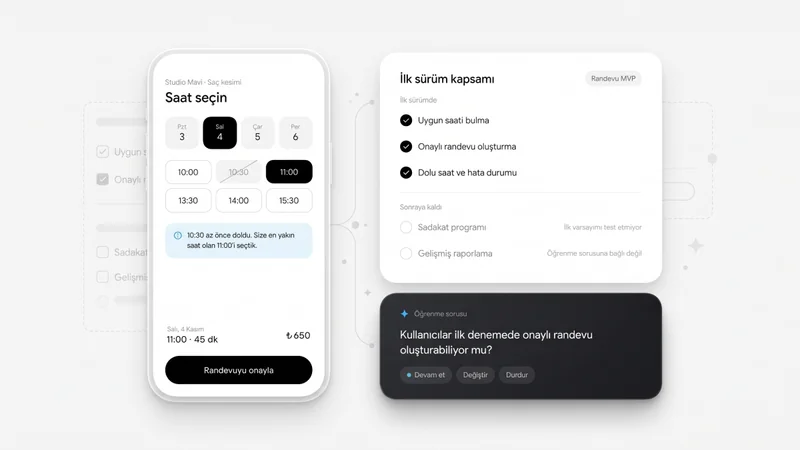
The first AI use case should be focused enough for the team to learn from it and measure user value.
Use these questions to prioritize opportunities:
| Criterion | Evaluation question |
|---|---|
| User value | What specific burden would solving this problem remove? |
| Frequency | How often does the problem occur? |
| Data readiness | Is the required information current, accessible and sufficient? |
| Verifiability | Can someone check whether the output is correct? |
| Cost of errors | How would a wrong result affect the user and the business? |
| Technical feasibility | Can the existing systems support a meaningful pilot? |
| Measurability | Can the result be compared with the current experience? |
Potential impact alone is not enough. A promising use case may be a poor starting point if the data is inaccessible or the consequences of errors cannot be managed.
In the procurement example, an initial pilot might produce an editable comparison of supplier terms with references to the source documents. The user reviews the draft and makes a decision through the existing approval process.
Also consider simpler solutions. Rules-based automation may be appropriate for a predictable task. Improving information architecture may be the right response to a poorly organized screen.
Output: One pilot use case with a defined scope, explicit assumptions and clear success criteria.
4. Define the data and the product’s boundaries together
The usefulness of an AI experience depends heavily on how reliably it connects to the information it needs.
Product, design and engineering teams should agree on the following:
- Which data sources will the system use?
- How often is that information updated?
- Which records can the user access?
- How will missing or conflicting information be handled?
- Which actions can AI only suggest?
- Which actions require explicit user approval?
For example, if a user cannot view a customer’s contract, they should not be able to obtain a summary of it through AI. Access boundaries need to be explained in the interface and enforced in the technical implementation.
Data freshness is also part of the experience. Users cannot properly evaluate a comparison if they do not know which documents or time period it covers.
Output: A scope defining the data sources, access boundaries, permitted actions and accountable owners.
5. Design the right interaction for the task
Users do not need to describe every task in an empty text field.
Some needs are easier to express through conversation. Others are better served by a selection, a comparison table or a suggestion within the screen the user is already working on.
| User need | Interaction to consider |
|---|---|
| Explore an open-ended topic | A conversational interface |
| Compare a few alternatives | A comparison table with accessible source references |
| Improve existing content | An editable suggestion alongside the content |
| Prepare a multistep action | A review and approval screen |
| Speed up a recurring task | A contextual action within the existing workflow |
In the procurement example, a “Compare terms” action for three selected quotes may be easier to understand than a general “What would you like to do?” prompt.
Design connects the system’s capabilities to the user’s current context. The effort required to discover the right prompt also counts toward the total effort of using the product.
6. Design for errors, uncertainty and user control from the start
An AI experience also needs to be evaluated when its output is wrong or incomplete.
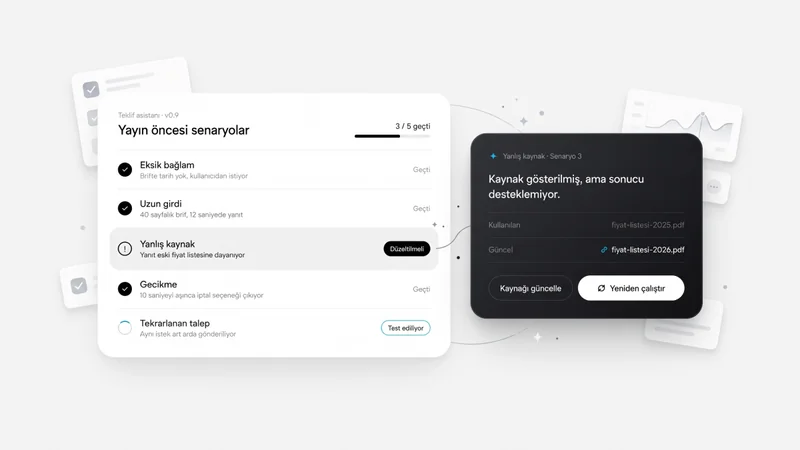
A comparison summary may look finished even though one document contains no delivery date. If the system fills that gap with a guess, a fluent result can lead to a poor decision.
A more useful experience:
- Clearly marks the missing field.
- Shows the source of the information it found.
- Allows the user to make corrections.
- Requests additional information when needed.
- Keeps the existing way of completing the task available.
Microsoft’s HAX guidelines address AI experiences across initial use, interaction, situations where the system is wrong and ongoing use. This provides a useful framework for considering failure states from the beginning of the design process.
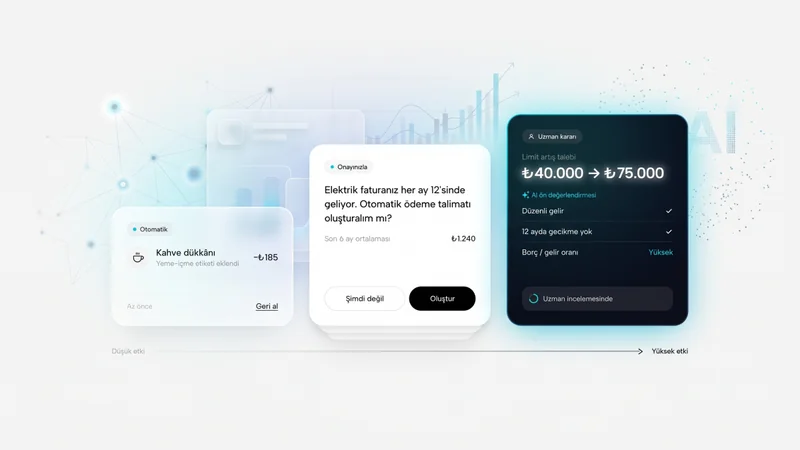
For experiences that change data, send content externally or initiate actions on the user’s behalf, the scope of the action should be visible before approval. Cancellation and undo options should be designed wherever the underlying action technically allows them.
Output: Flows covering missing data, incorrect results, corrections, approvals and alternative ways to finish the task, alongside the primary flow.
7. Validate the experience and the technical performance separately
A prototype can show whether users understand the proposed experience. On its own, it cannot prove that a model will perform accurately enough with real data.
Two types of validation are therefore needed.
Experience validation: Do users understand what they can do? Can they assess the result? Can they spot and correct errors? Can they complete the job with less effort?
Technical validation: Does the system produce accurate and consistent results on realistic data? Does it respect access boundaries? Are response times and processing costs acceptable?
BCG’s approach to testing generative AI products also evaluates usability, trust and users’ understanding of the system’s capabilities alongside output quality.
Testing should include more than neatly prepared examples. Incomplete documents, different ways of expressing the same request, conflicting information and cases where the system should not answer all belong in the evaluation.
Output: User research findings, technical evaluation results and a list of issues to address before the pilot.
8. Measure success through completed work
The number of times an AI feature is opened can indicate interest. Understanding its product value requires looking at the outcome of the work.
In the procurement example, the key question goes beyond how many comparisons were generated:
How long did it take the user to reach an accurate comparison, including the corrections they had to make?
Select the metrics that fit the pilot:
| Measurement area | Example metric |
|---|---|
| Task success | Share of users who complete the task correctly |
| Total effort | Completion time, including preparation, review and correction |
| Output quality | Rate of missing or incorrect information |
| User control | Success in identifying and correcting flawed output |
| Adoption | Repeat use when the relevant need arises again |
| Economic value | Total cost per successfully completed task |
| Operational impact | Support requests, rework or intervention required |
Record baseline measures for the current experience before starting. With sufficient traffic and suitable conditions, controlled comparisons can help assess the effect. At lower usage volumes, evaluate comparable task-based tests together with qualitative findings.
The decision to scale should also depend on criteria set in advance. If completion time falls while critical errors increase, the solution’s scope needs to be reconsidered.
An example plan for a first pilot
The following is a starting framework for a narrowly scoped product use case. Data access, integrations and the product’s risk profile may change the timeline.
| Timing | Focus | Expected output |
|---|---|---|
| Week 1 | User needs and the current workflow | Problem definition and baseline measures |
| Week 2 | Opportunities, data and feasibility | Priority use case and pilot scope |
| Weeks 3–4 | Interaction design and technical exploration | Testable prototype and technical findings |
| Week 5 | User testing and error scenarios | Prioritized improvements |
| Week 6 | Pilot preparation and evaluation | Measurement plan and a decision on next steps |
By the end of this work, the team should be able to explain which problem it is solving, who it is solving it for, AI’s role, the boundaries of human control and how success will be measured.
How VOYA approaches AI product transformation
At VOYA, we approach AI product transformation through product strategy and user experience. We examine the existing product, the jobs users need to complete and the business goals together.
The process moves through identifying AI opportunities, rethinking selected workflows, creating interactive prototypes and validating the experience with real users. We turn validated concepts into designs ready for development, while clarifying responsibilities for model selection, integration and software implementation with the engineering team.
A useful starting point may be a workflow that asks users to do a significant amount of interpretation, repetitive work or follow-up. Examining that workflow gives the team a concrete direction for exploring where AI investment could create meaningful value.
Explore VOYA’s AI Product Transformation approach to identify opportunities in your product.
Frequently asked questions
Where should AI transformation start in an existing digital product?
Start with a recurring user problem whose impact is observable and whose outcome can be measured. Examine the current workflow, assess the required data and validate a focused use case through a prototype and a technical experiment.
Does AI transformation require a complete product redesign?
Not always. You can begin with a specific task or user workflow. The need for broader changes can then be assessed using pilot findings and the constraints of the existing product.
What role does UX design play in AI features?
UX design helps users understand when to use AI, assess its output, make corrections and complete their work. It also covers waiting, uncertainty and error states.
How do you know whether the first pilot has succeeded?
Compare task success, total completion time, correction effort and cost against the current experience. Usage counts become meaningful when considered alongside these outcomes.
Sources and further reading


Explore All Blogs




























Ready to talk
about your project?
Do you have a clear vision regarding the ideas, goals, requirements, and desired outcomes for your project? Let's take the first step together by setting up a meeting to bring all of these to life.